Home / Custom Software / Restaurant Software
CatalystOS / Restaurants

One system for
the whole restaurant.

Point of sale, online orders, scheduling, the time clock, the cash count, tips, pay periods, and reports, in one system with one staff list and one set of rules. Built around how your restaurant already runs, with support from real Americans.

01 / The system

Every shift,
start to close.

These are real screens from the system we built for a full-service restaurant in Colorado. Each part feeds the next: the schedule feeds the time clock, the time clock feeds the tip split, and the tip split feeds the pay period.

/ 01 Point of sale

The floor, on one shared iPad.

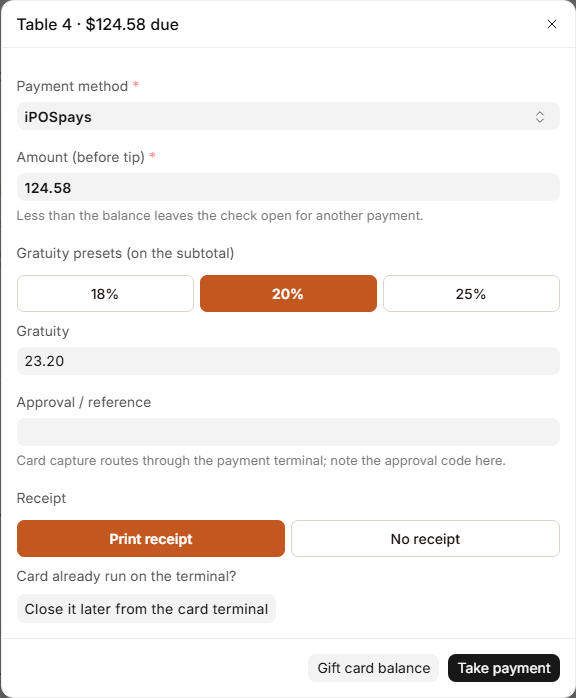
Servers sign in with their clock-in PIN, tap a table, ring items, send them to the kitchen, and take payment, all from one screen.

  • The floor plan shows every table’s state at a glance: available, seated, ordered, entrée, check dropped, or dirty.
  • Items are rung by seat and by course, with allergy flags and notes for the kitchen.
  • Split a check by seat. The seat checks always add up to the table total.
  • Voids always need a reason, so they can be reviewed later.
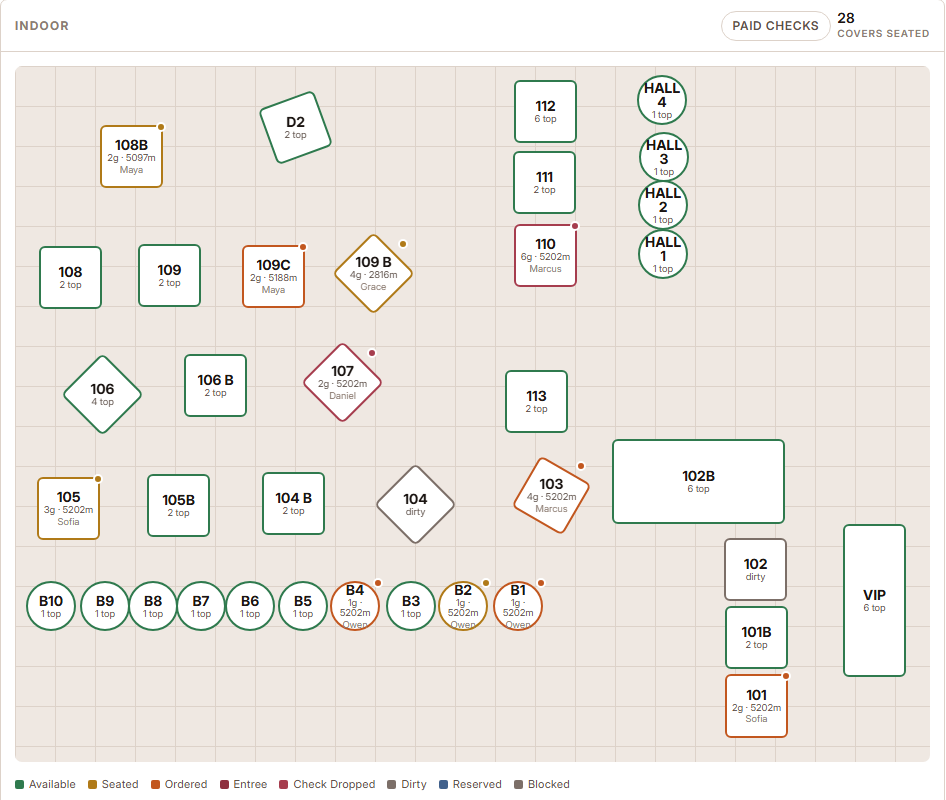
A restaurant floor plan with tables colored by status: available, seated, ordered, entrée, check dropped and dirty.
The floor. Occupied tables show guests, minutes open, and the server.
A payment box for Table 4 with the amount due, gratuity presets of 18, 20 and 25 percent, and a print receipt option.
Taking payment with a gratuity preset.
/ 02 Online orders

Pickup orders land where the floor already works.

Guests order pickup on your website and pay by card there. The paid order shows up on the Service Terminal, where the floor sends it to the kitchen, marks it ready, and hands it over.

  • A manager chooses which dishes are offered online and sets the pickup times.
  • One switch pauses online orders when the kitchen is slammed.
  • Gift cards are sold on a check, redeemed at payment, and tracked with a running balance.
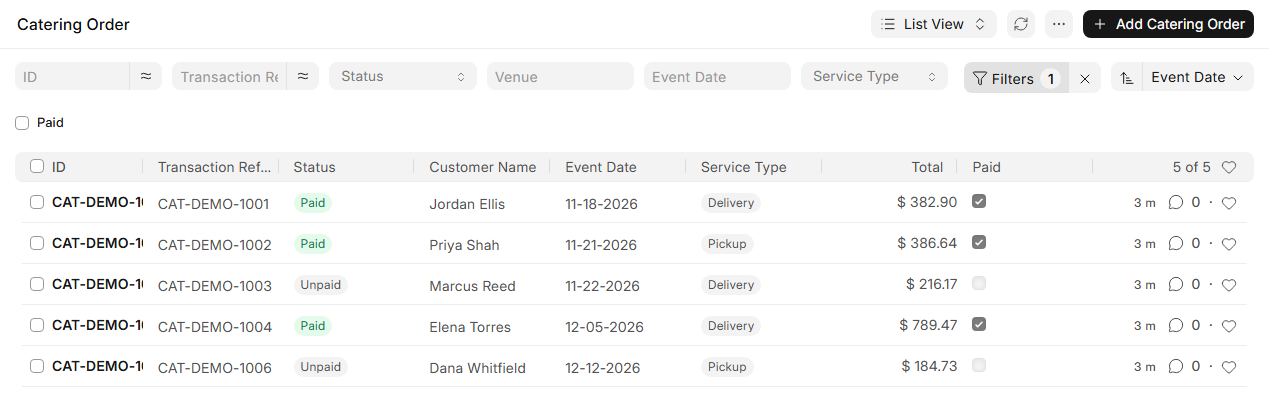
  • Catering orders placed and paid on the website appear in their own list, sorted by event date.
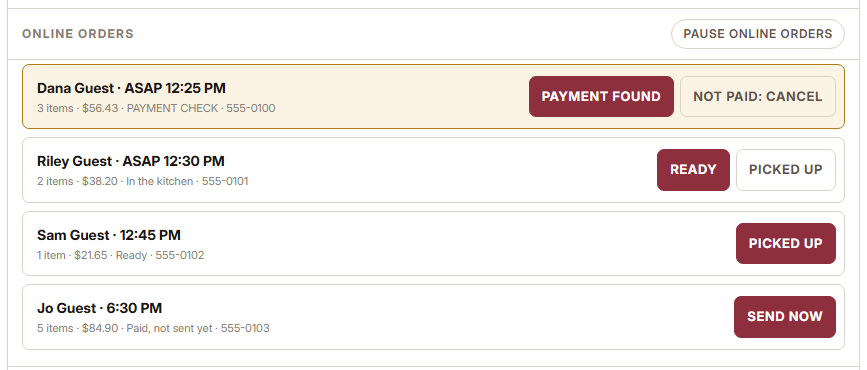
A list of online pickup orders with buttons for Payment found, Ready, Picked up and Send now.
Online orders on the terminal, each with its next step.
A list of upcoming catering orders with customer, event date, delivery or pickup, total and paid status.
Upcoming catering orders, soonest first.
/ 03 Scheduling

A week’s schedule from a template, not from scratch.

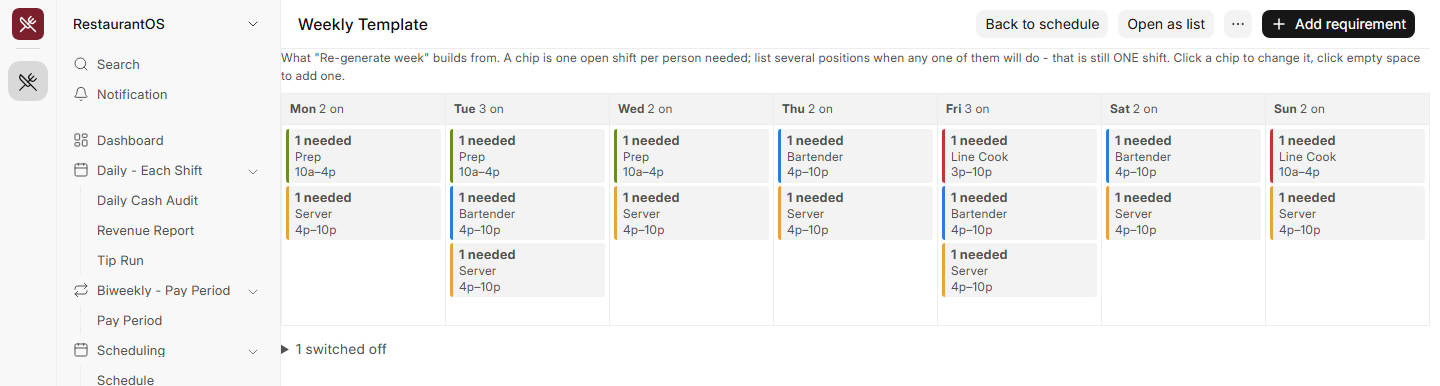
Set the weekly template once: how many people each day needs, in which position, at what times. The system opens the week, proposes who works what, and nothing reaches staff until you publish.

  • The proposal respects availability and approved time off, so nobody is booked on a day they can’t work.
  • Staff request time off themselves. A manager or scheduler approves or denies it.
  • Clashes are outlined in red on the grid before you publish.
  • Print or download the week as a PDF for the kitchen wall.
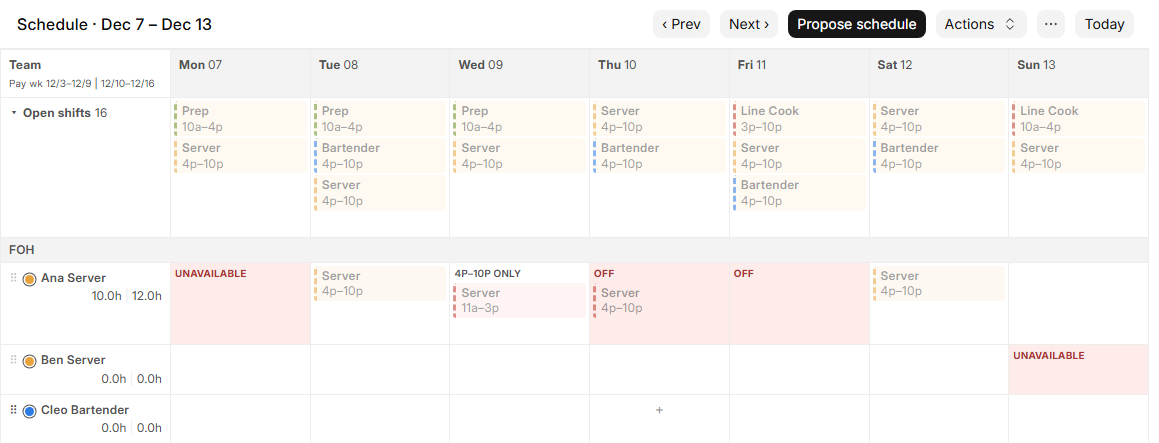
A weekly schedule grid with open shifts across the top and staff rows below, with days off and unavailable days marked in red.
Days off and unavailable days are marked on the grid.
A weekly template showing how many people are needed each day, by position and shift time.
The weekly template: who is needed, in which position, and when.
/ 04 Time clock

One PIN pad. Punches that match the schedule.

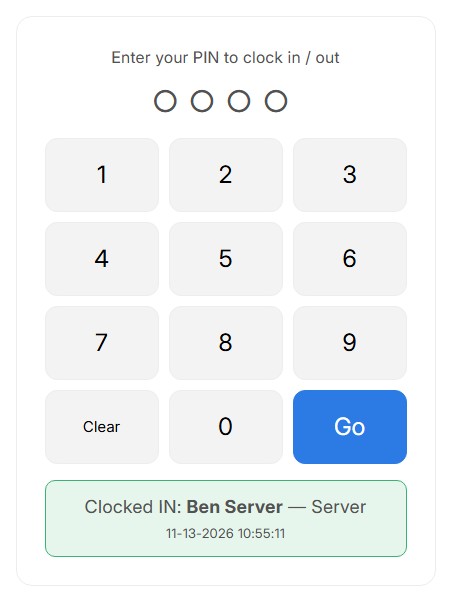
Staff clock in and out by typing their own PIN on a shared kiosk. The kiosk checks the published schedule first, so the hours line up with the shift that was planned.

  • Clock-in opens 30 minutes before a shift by default. A manager can change the rule.
  • The position comes from the schedule, so nobody picks the wrong role at the kiosk.
  • If someone changes jobs mid-shift, a manager records it and the hours split between the two roles.
  • A missed clock-out is fixed on the entry, and worked hours recalculate.
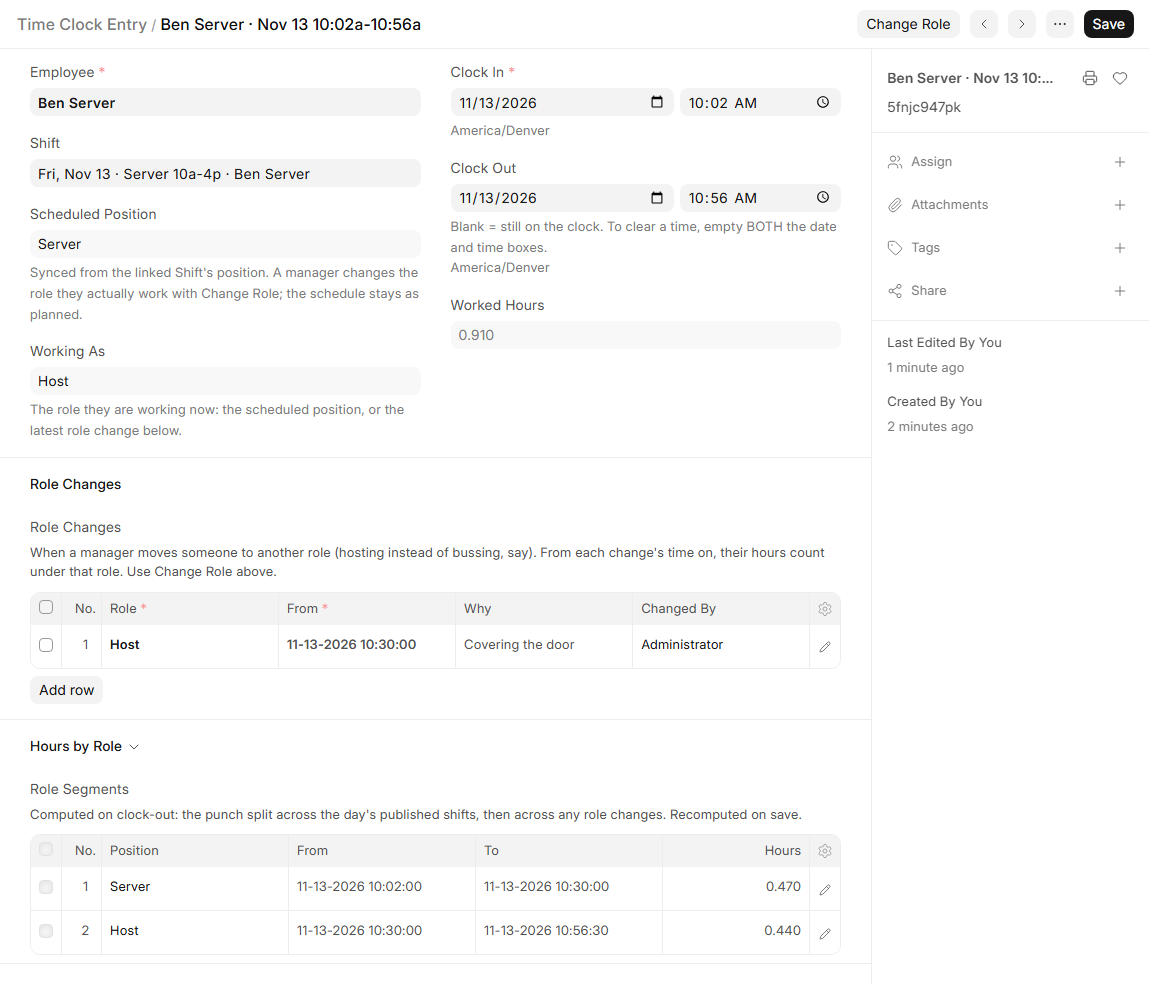
A time clock entry scheduled as Server, with a role change to Host and the hours listed under each role.
One punch, split between Server and Host.
A PIN pad with a green banner that reads Clocked IN with the employee name, position and time.
A green banner confirms the clock-in.
/ 05 Shift close

Count the drawer. Check the revenue. Split the tips.

Every shift closes with three records, and each one feeds the next. The cashier counts the drawer, the manager checks revenue by payment method, and the tip pool is divided.

  • The counted drawer is the cash number. If it does not match what the figures predict, a banner says how much it is short or over.
  • Card totals come in from the processor on their own.
  • The tip roster is built from the time clock, then split by category and weight.
  • A warning appears if payouts would exceed the pool, or if the house share falls below its usual cut.
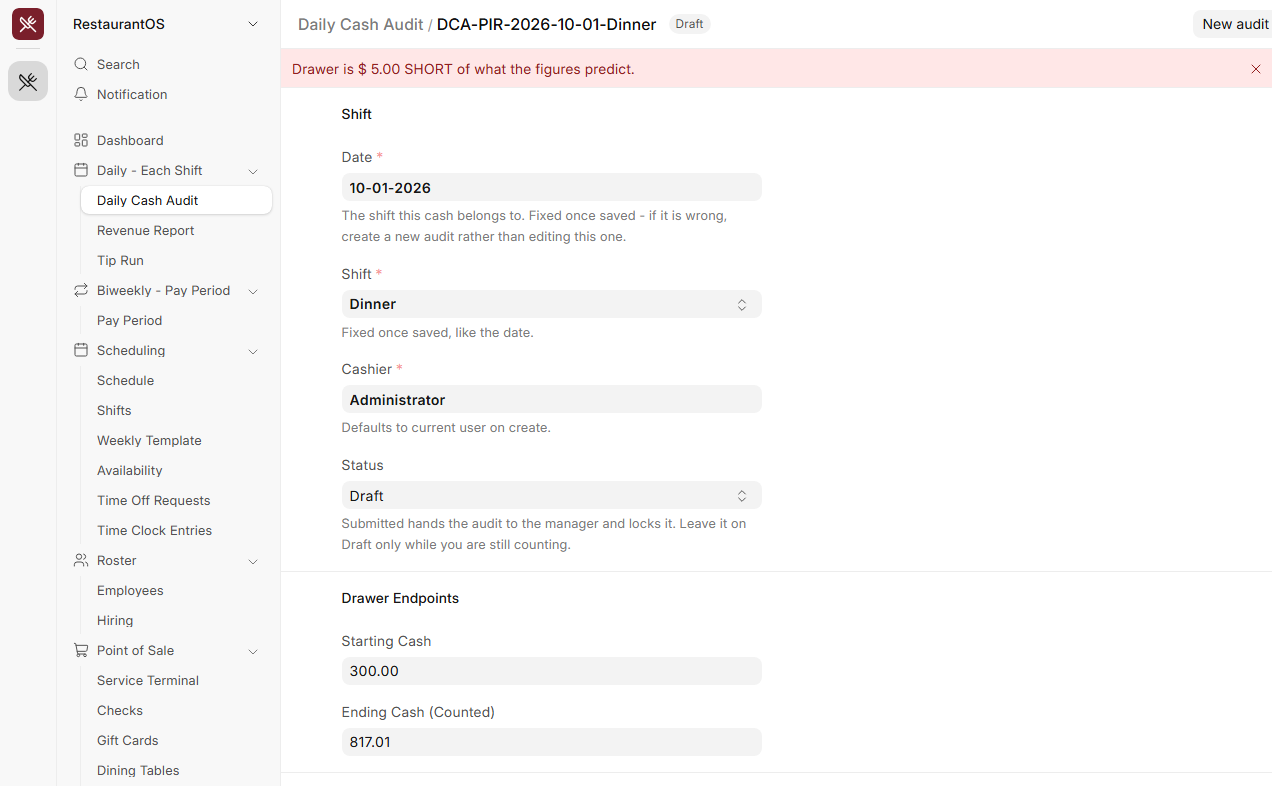
A daily cash audit with a red banner saying the drawer is 5 dollars short of what the figures predict.
A cash audit. The banner reports a short drawer.
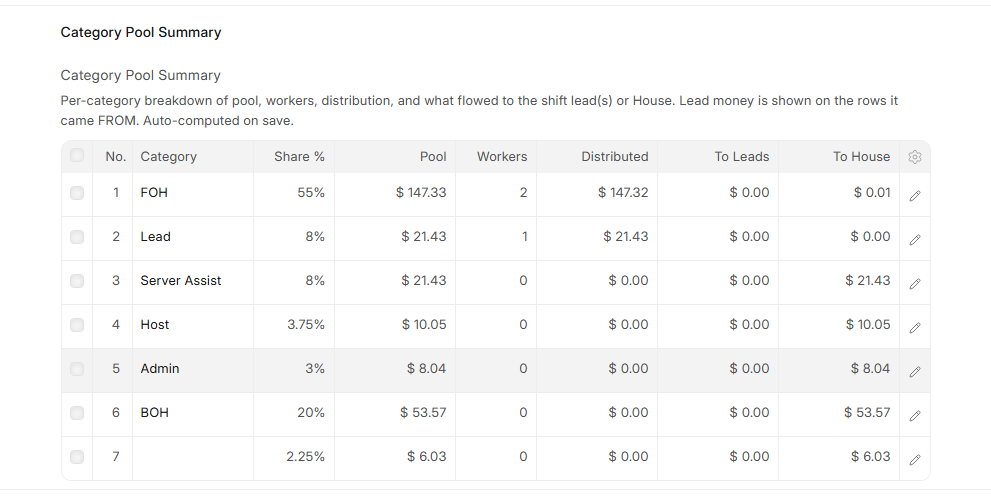
A table of tip categories with each category’s share, pool, number of workers, amount distributed and amount to the house.
Each tip category’s pool and how it was divided.
/ 06 Pay periods

Two weeks of tips, added up for you.

A pay period totals every finalized tip run inside its dates, so you know what each person is owed without a spreadsheet.

  • One row per employee, with total tips and the number of shifts behind it.
  • Open a row to see exactly which shifts make up the total.
  • A period can’t close while a cash audit inside it is still a draft.
  • If a shift is corrected later, compute the payouts again and the period updates.
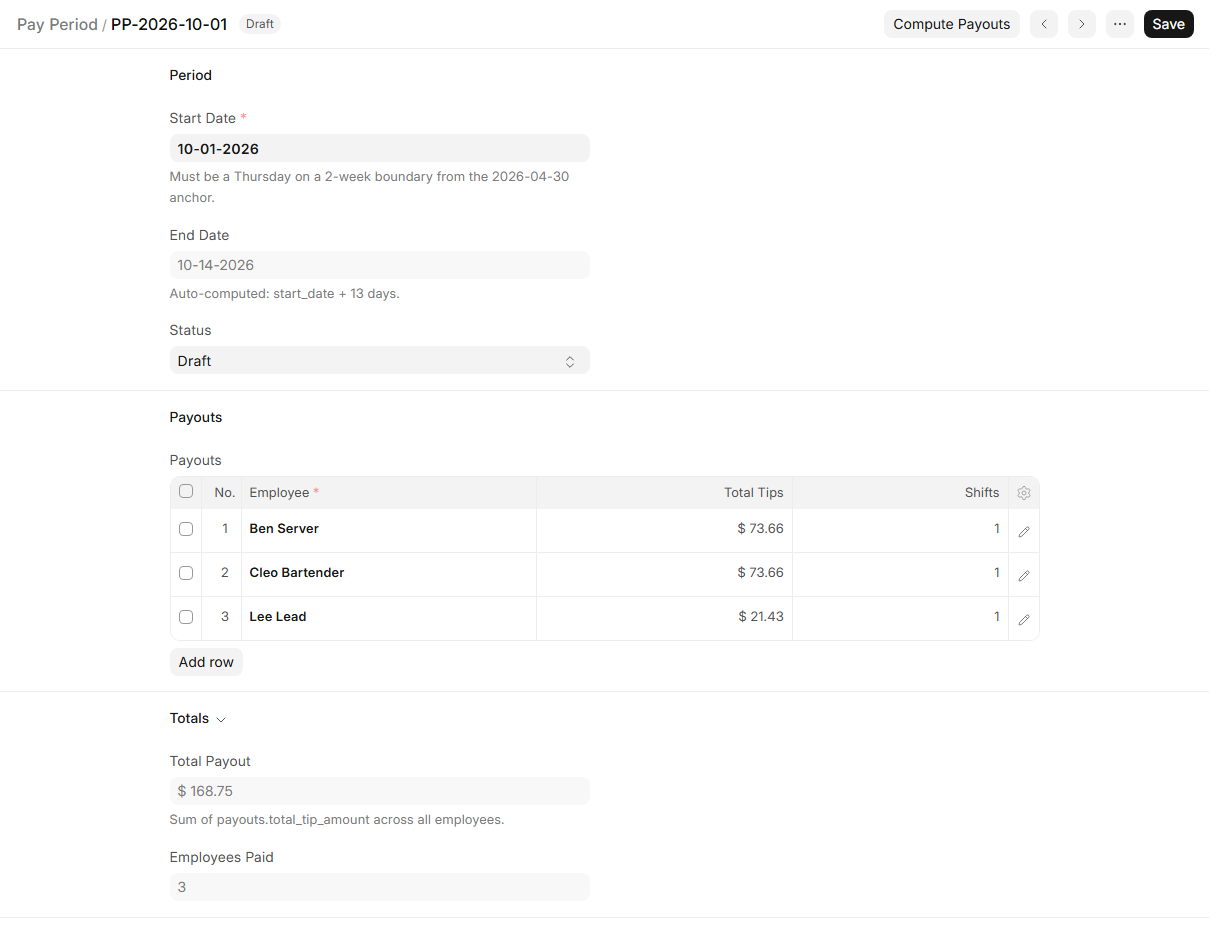
A pay period with a payouts table listing each employee, their total tips and shifts, and a total payout below.
A pay period after computing payouts.
/ 07 Reports

The numbers you already record, readable in a minute.

Reports are built from the checks, punches, cash audits, and revenue reports the team already enters. Nothing is typed twice.

  • Sales by item and by server, with tips, discounts, and voids.
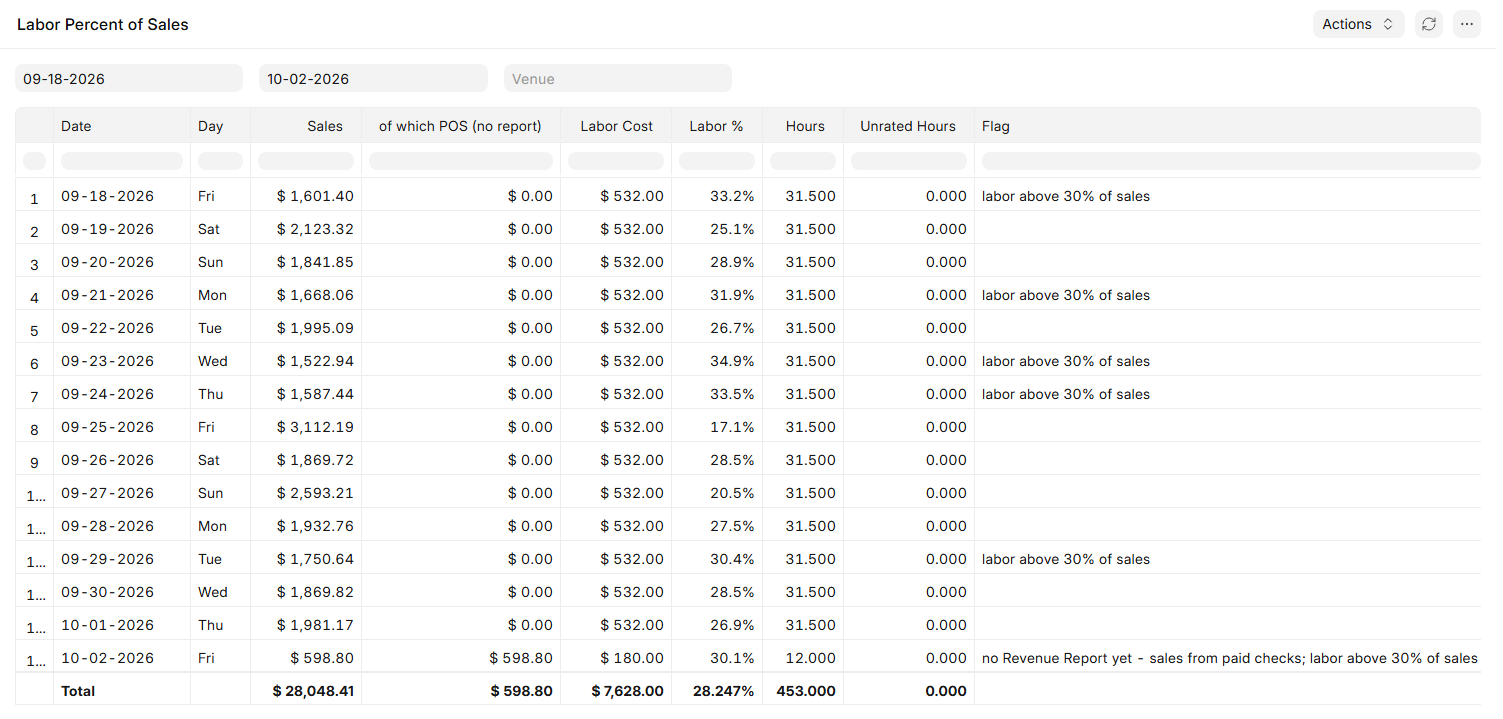
  • Labor as a percent of sales, with days above 30% flagged.
  • Voids: what was voided, who voided it, who approved it, and why.
  • Cash reconciliation and hours by role. Every report prints or exports.
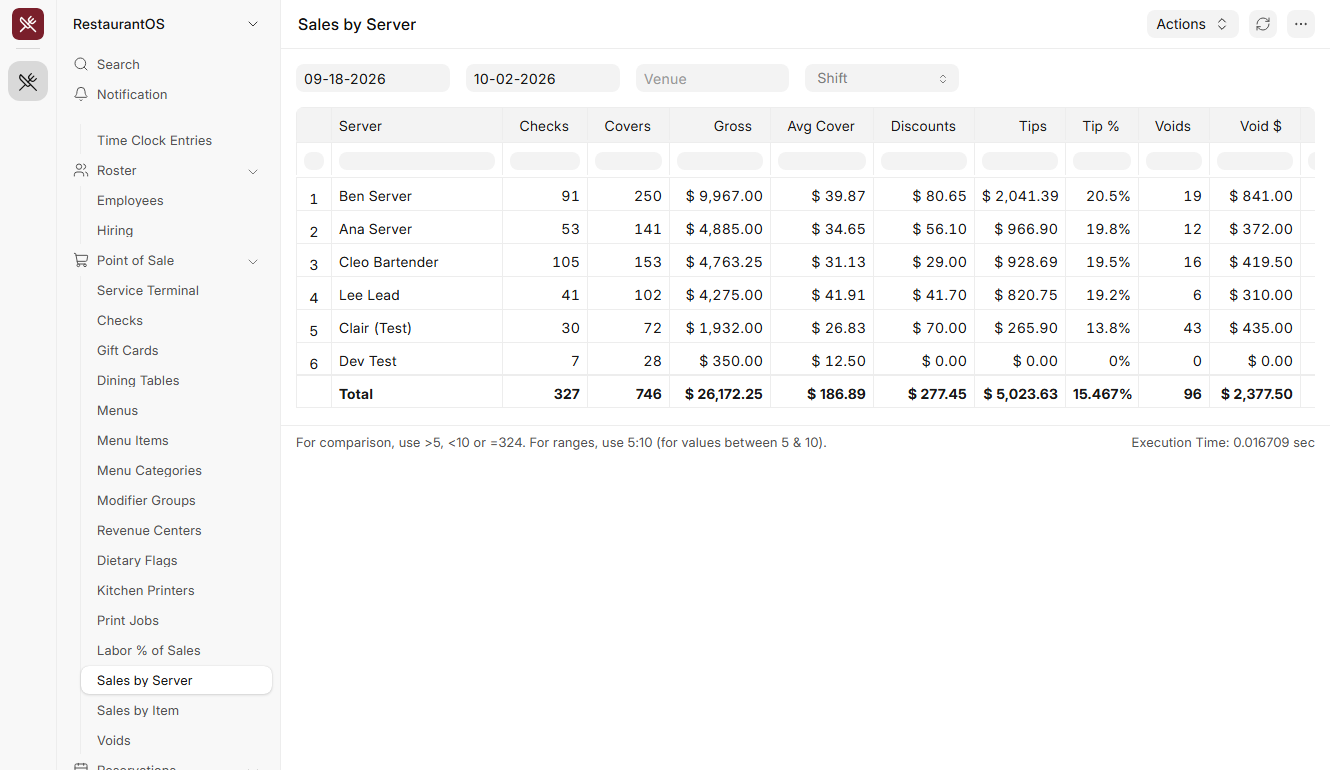
A sales by server report with checks, covers, gross sales, average per cover, tips and voids for each server.
Sales by Server.
A labor percent of sales report with one row per day and flags on days where labor is above 30 percent of sales.
Labor % of Sales. High days are flagged.
/ 08 Menu and inventory

What you sell, what you buy, and what it costs.

The menu is what servers ring, and inventory is what you buy and count. Both live in the same system, so plate cost follows the price you actually paid.

  • Menu items with modifiers, sides, and timed prices such as happy hour.
  • 86 an item, or sell it until it runs out.
  • Recipes show batch cost, cost per plate, and cost percent.
  • Count sheets for inventory. Only a manager sees the dollar values.
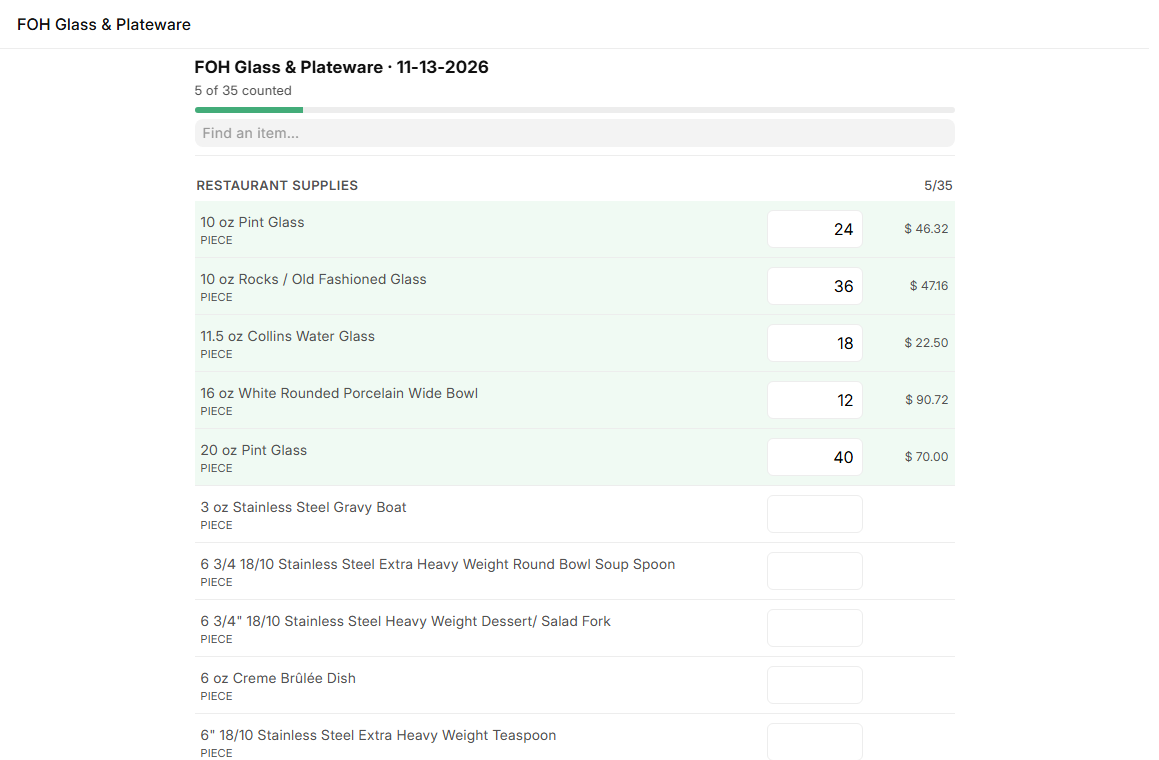
An inventory count in progress with counted rows highlighted in green and a progress bar at the top.
A count in progress. Counted rows turn green.

Screenshots were taken on a test system. Names, dates, and figures are sample data.

02 / Also in the system

The rest of the house.

The parts that don't need a screenshot to explain, built into the same system with the same staff list.

/ 01

Reservations.

A reservation schedule sets the times guests can book and how many bookings each time takes. Hosts take and update reservations, and bookings can come from the website.

/ 02

Events.

Ticketed events with a guest limit, meal choices, and a kitchen count for each meal. Repeat an event to later dates.

/ 03

Hiring.

One form creates a new hire’s roster record, login, kiosk PIN, and first shift. When someone leaves, their record is switched off without losing its history.

/ 04

Availability and time off.

Availability is set per weekday. Time off is requested by staff and approved by a manager or scheduler, then marked on the schedule.

/ 05

Floor and printers.

Sections, tables, and seats are drawn to match your room. Each menu item routes to its station’s printer, and failed tickets can be reprinted.

/ 06

Roles.

Access follows the job: staff see their own records, and leads, schedulers, and managers see what their role needs.

03 / Why custom

Your rules,
not a template's.

Every restaurant owner runs their business a little differently. Off-the-shelf software makes you change how you work to fit what it can do. We build the system around the way your restaurant already runs.

A stack of separate apps

Numbers carried by hand.

  • × The schedule, the register, and the tip sheet don't talk to each other.
  • × Someone retypes sales totals after every shift.
  • × Tips are split in a spreadsheet that only one person understands.
  • × Per-user pricing means the bill grows every time someone is hired.
One system

One staff list. One set of rules.

  • ✓ The schedule, time clock, cash count, sales, tips, and pay periods share the same records.
  • ✓ Saving the cash count builds the shift's sales report.
  • ✓ Your tip rules are the system's rules, with checks wherever money moves.
  • ✓ Unlimited users, so the whole team is in.
Read the case study

The restaurant this was built for had its schedule, card sales, and tips in separate tools, with the owner and one manager carrying numbers between them by hand. See what changed.

04 / FAQ

Common questions.

If yours isn't here, send us a brief.

Is this an app I can sign up for?

No. It is a custom system we build on CatalystOS and shape to your restaurant: your floor plan, your positions, your tip rules, your shifts. The screens on this page come from the system we built for a full-service restaurant in Colorado.

Do you charge per user?

No. Users are unlimited, so every server, cook, host, and manager can have a login without the bill going up.

Does it replace our point of sale?

It can. The Service Terminal handles tables, seats, courses, sending to the kitchen, splitting checks, and taking payment. If you would rather keep the register you have, we scope what the system should take over during discovery.

How are tips split?

By your rules. Each shift has a tip pool. The system builds the roster from the time clock, puts each person in their tip category, applies their weight, and shows what every person is paid and what is left for the house. A manager can override a row, and a warning shows if the payouts would exceed the pool.

Can staff see each other’s records?

No. Staff see their own punches, availability, and time off requests. Leads, schedulers, and managers see more, according to their role.

Who provides support?

Real Americans, based here in Colorado, who know how your system was built.

Stop carrying numbers
between apps.

Book a discovery call. We'll walk through how your restaurant runs and tell you, candidly, whether a custom system is the right fit.